



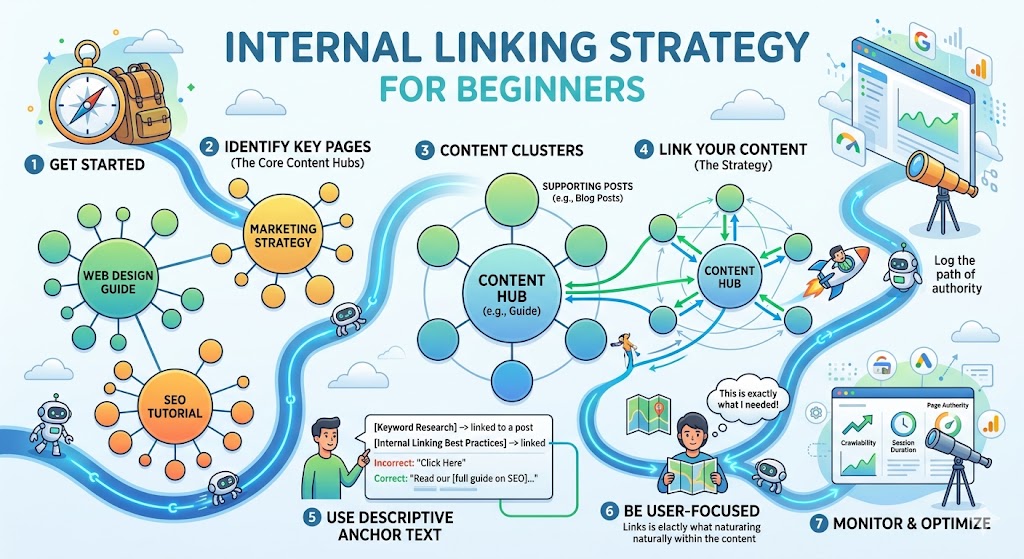
Internal Linking Strategy for Beginners
Introduction
Have you ever clicked on a blog post, started reading, and suddenly found yourself three pages deep on the same website? You didn’t search again. You didn’t open a new tab. You just kept clicking links within the site.
That’s internal linking at work.
Most beginners focus on keywords, backlinks, or writing more content. But they overlook one of the simplest and most powerful SEO tools available: how pages on your own website connect to each other. Internal linking isn’t just about navigation it shapes how search engines understand your site and how readers move through your content.
In this guide, you’ll learn what internal linking really means, why it matters for SEO, how it improves rankings and user experience, and exactly how beginners can build a smart internal linking strategy without overcomplicating things. If you want your website to grow steadily instead of randomly, this is where you start.
What Is Internal Linking (Beyond the Basic Definition)?
An internal link is a hyperlink that connects one page on your website to another page on the same website.
That’s the textbook definition.
But strategically, internal linking does three important things:
-
Helps search engines discover and understand your content
-
Distributes authority (link equity) across your pages
-
Guides users toward relevant information
Think of your website like a city. Each page is a building. Internal links are the roads. Without roads, buildings exist—but nothing connects them. Search engines can’t explore efficiently. Visitors get lost.
A strong internal linking structure turns your website from a collection of isolated articles into a well-organized ecosystem.
Why Internal Linking Matters for SEO
Many beginners chase backlinks from other websites (which are important), but ignore internal links. Here’s why that’s a mistake.
1. It Improves Crawlability
Search engines use bots (like Googlebot) to crawl websites. They discover new pages by following links.
If a page has no internal links pointing to it, it becomes what’s called an “orphan page.” Search engines may struggle to find or index it.
Internal links ensure:
-
Important pages are easily discoverable
-
New content gets indexed faster
-
Deep pages aren’t buried
2. It Passes Authority Between Pages
When one of your pages earns backlinks, it gains authority. Internal links allow you to pass some of that authority to other relevant pages.
For example:
If your homepage is strong and trusted, linking from your homepage to a key service page can boost that page’s ranking potential.
This is called distributing link equity.
3. It Improves User Experience and Engagement
Internal linking keeps users on your site longer by guiding them to related content.
That means:
-
Lower bounce rates
-
More page views
-
Higher engagement
-
Increased conversions
SEO isn’t just about rankings. It’s about creating logical content journeys.
How Search Engines Interpret Internal Links
Search engines look at three major factors when evaluating internal links:
1. Anchor Text
The clickable text of a link tells search engines what the linked page is about.
For example:
-
Weak anchor: Click here
-
Strong anchor: beginner’s guide to keyword research
Clear anchor text helps Google understand context.
2. Link Placement
Links placed within the main body content carry more weight than links in footers or sidebars. Contextual links (within paragraphs) are more valuable.
3. Link Depth
Pages closer to your homepage usually receive more authority. If a page requires five clicks to reach, it may not rank as strongly.
This is why site structure matters.
Building a Beginner-Friendly Internal Linking Strategy
Let’s move from theory to practice.
Step 1: Create Topic Clusters
One of the most effective internal linking models is the topic cluster structure.
Here’s how it works:
-
You create one main page (pillar page) on a broad topic.
-
You create multiple supporting articles (cluster content).
-
All supporting articles link back to the pillar.
-
The pillar links to all supporting articles.
For example:
Pillar Page: “Complete Guide to Digital Marketing”
Cluster Articles:
-
SEO Basics
-
Social Media Marketing
-
Email Marketing
-
Content Marketing
Each article links to the pillar and to related cluster posts.
This structure signals topical authority to search engines.
Step 2: Link Contextually, Not Randomly
Every internal link should answer a reader’s next logical question.
If you’re writing about on-page SEO and mention “meta descriptions,” link to your article explaining meta descriptions.
Don’t force links just for SEO. Relevance matters more than quantity.
Step 3: Prioritize Important Pages
Not all pages are equal.
Decide which pages matter most:
-
Core service pages
-
High-converting product pages
-
Key educational guides
-
Cornerstone content
Then ensure multiple relevant pages link to them.
This reinforces their importance to search engines.
Step 4: Avoid Overlinking
Beginners sometimes think more links equal better SEO. That’s not true.
Too many links:
-
Confuse readers
-
Dilute authority
-
Look spammy
Focus on quality over quantity. If a link doesn’t add value, remove it.
Common Internal Linking Mistakes Beginners Make
1. Using Generic Anchor Text
“Read more” doesn’t help search engines understand content.
Instead, use descriptive phrases that reflect the linked page’s topic.
2. Linking Only to New Posts
Many bloggers link from new content to old content but never update older articles to link back.
Internal linking should be a two-way process.
3. Ignoring Site Structure
If your navigation menu, categories, and URLs are messy, internal linking becomes chaotic.
A clean hierarchy looks like this:
Homepage
→ Category
→ Subcategory
→ Article
Logical structure supports internal linking naturally.
4. Creating Orphan Pages
Every page should have at least one internal link pointing to it. Ideally, more than one.
Regular content audits help identify orphan pages.
Real-World Example: A Small Blog’s Growth
Let’s consider a small educational blog publishing articles about digital skills.
At first:
-
Articles were published randomly.
-
No internal linking strategy.
-
Traffic remained stagnant.
Then they reorganized:
-
Identified 5 core topics.
-
Created pillar pages.
-
Linked all related articles to those pillars.
-
Updated older posts with contextual internal links.
-
Reduced unnecessary footer links.
Within a few months:
-
Crawl rate improved.
-
Several pillar pages moved to page one.
-
Average session duration increased.
The content didn’t change much. The structure did.
That’s the power of internal linking.
How Internal Linking Fits into the Bigger SEO Picture
Internal linking is part of on-page SEO, but it supports technical and off-page efforts as well.
-
Technical SEO: Clean architecture helps search engines crawl efficiently.
-
Content Marketing: Strong internal linking improves content discoverability.
-
Conversion Optimization: Guiding users through funnels increases conversions.
-
Authority Building: It reinforces topical expertise.
It acts as the glue that holds your SEO strategy together.
You can write amazing content. You can earn backlinks. But without strong internal connections, your website won’t reach its full ranking potential.
Practical Internal Linking Skills Beginners Should Develop
If you’re just starting, focus on these habits:
1. Map Your Content
List all your published pages in a spreadsheet. Identify:
-
Main topics
-
Related posts
-
Orphan pages
Seeing your structure visually helps spot gaps.
2. Audit Anchor Text
Check if your anchor text:
-
Describes the destination page
-
Uses natural language
-
Avoids repetition or stuffing
3. Plan Links Before Publishing
Before publishing a new article, ask:
-
Which older articles should I link to?
-
Which future articles will link back here?
This creates intentional structure.
4. Update Old Content Regularly
Internal linking isn’t a one-time task. Revisit older content every few months and add relevant links to newer articles.
This keeps your website interconnected and fresh.
Internal Linking and SEO Careers
As SEO evolves, site architecture and content strategy are becoming more important.
Modern SEO roles include:
-
SEO Strategist
-
Content Strategist
-
Technical SEO Specialist
-
Growth Marketing Manager
All of these roles require understanding internal linking structures.
Search engines are getting smarter. They don’t just analyze keywords they analyze context, relationships, and topical depth. Internal linking helps communicate that depth clearly.
For beginners looking to build an SEO career, mastering internal linking shows strategic thinking not just technical execution.
FAQs: Internal Linking Strategy for Beginners
1. How many internal links should I use per page?
There’s no fixed number. Focus on relevance. Most blog posts naturally include 3–8 contextual internal links without feeling forced.
2. Can too many internal links hurt SEO?
Yes. Overlinking can dilute authority and overwhelm users. Keep links meaningful and necessary.
3. What’s the difference between internal and external links?
Internal links connect pages within your website. External links point to other websites. Both are important, but they serve different purposes.
4. Should I use exact-match keywords in anchor text?
Use descriptive anchor text naturally. Avoid repeating the exact same keyword every time it can look manipulative.
5. How often should I update internal links?
Review and optimize internal linking every few months, especially after publishing new content.
Conclusion: Structure Builds Authority
Internal linking isn’t flashy. It doesn’t feel as exciting as chasing backlinks or going viral. But it’s one of the most controllable and impactful parts of SEO.
It helps search engines understand your expertise. It guides users through meaningful content journeys. It strengthens important pages. And it turns scattered posts into a cohesive digital asset.
For beginners, mastering internal linking builds foundational SEO thinking: organization, clarity, and strategy.
If you want your website to grow steadily, start connecting your ideas. Because in SEO, structure isn’t just technical—it’s strategic.
And once you understand that, you’re no longer just publishing content. You’re building authority.
Tags :
No Tags

0 Comments