



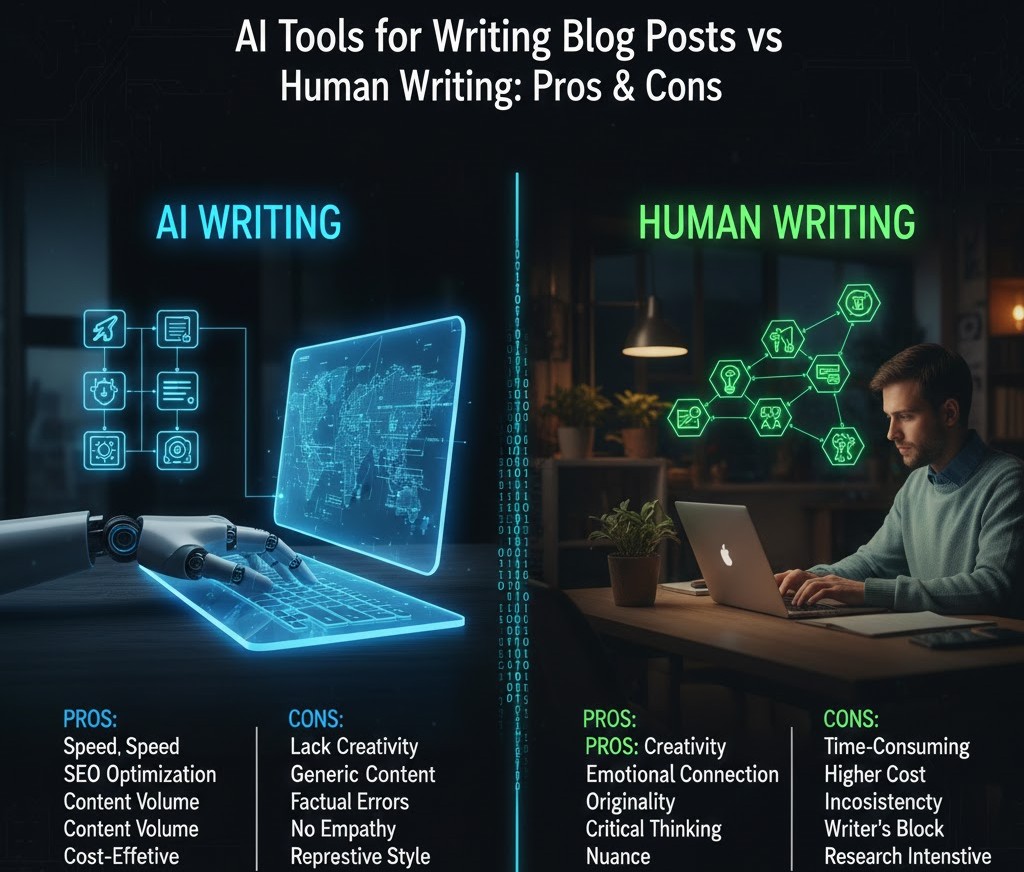
AI Tools for Writing Blog Posts vs. Human Writing: Pros, Cons & What Students Should Know
Introduction
If you’ve ever stared at a blank Google Doc wondering how to start your next blog assignment or wished your writing flowed like your favorite creator’s you’re not alone. Students today are navigating an academic and digital world where writing isn’t just something you do for a grade. It’s a skill that shapes personal branding, communication, and even job opportunities.
At the same time, AI writing tools have exploded in popularity. Tools like ChatGPT, Jasper, Notion AI, and Writesonic promise faster content creation, cleaner grammar, and instant topic ideas. Many students wonder: Are AI writing tools better than human writing? Can AI replace writers? Should I rely on AI especially if I want to improve my skills?
This article breaks down the real pros and cons of AI tools vs. human writing, drawing on insights from educators, cognitive researchers, digital marketing experts, and writing coaches. You’ll learn how AI actually works behind the scenes, when using AI makes sense, and when human creativity matters most. By the end, you’ll know how to balance both approaches in a way that strengthens your writing not replaces it.
AI Tools for Writing Blog Posts vs. Human Writing: A Deep Dive
What Exactly Are AI Writing Tools?
AI writing tools use machine learning models trained on massive amounts of text. These tools analyze patterns—how sentences flow, how arguments are structured, and how topics are typically discussed.
Modern AI writing systems rely heavily on:
-
Large Language Models (LLMs)
-
Natural Language Processing (NLP)
-
Semantic clustering and topic modeling
-
Predictive text generation
Instead of "thinking" like humans, AI predicts the next most likely word based on statistical patterns. This is why AI can generate impressive paragraphs instantly but may miss nuance, context, or emotional depth.
Expert Insight:
Dr. Ethan Mollick, a professor at Wharton and a leading voice on AI in education, emphasizes that AI is powerful but should be treated like a “smart intern: capable, fast, but requiring guidance.”
Benefits of AI Tools for Writing Blog Posts
1. Speed and Efficiency
AI tools can produce a draft in seconds a game changer when deadlines are tight.
You can instantly generate:
-
Outlines
-
Title ideas
-
Intro paragraphs
-
Keyword lists
-
Topic summaries
-
Full drafts
For students juggling classes, part-time jobs, and activities, AI dramatically reduces time spent on brainstorming.
2. Grammar, Structure & Readability Support
Tools like Grammarly, QuillBot, and Hemingway Editor help students strengthen:
-
Sentence clarity
-
Tone consistency
-
Grammar accuracy
-
Reading level
This is especially helpful for non-native English speakers or students struggling with writing anxiety.
3. Idea Generation & Research Assistance
AI excels at summarizing research, suggesting angles, and surfacing new perspectives.
For example, if you need an article about climate change solutions, AI can:
-
Provide high-level summaries from credible institutions
-
Compare different viewpoints
-
Suggest statistics to use (which you should always verify)
4. Accessibility & Inclusivity
Students with learning differences such as ADHD or dyslexia often find AI tools helpful for brainstorming or structuring ideas before writing manually.
5. Consistency in Tone
AI can match a style: academic, casual, humorous, or professional.
This is useful when writing multi-part assignments requiring the same tone across sections.
Limitations of AI Writing Tools (What AI Still Can’t Do)
1. Lack of Original Thought
AI doesn’t have personal experiences.
It cannot reflect:
-
Your emotions
-
Your lived stories
-
Your unique voice
-
Cultural context
This is where human writing shines.
2. Risk of Inaccuracy (“Hallucinations”)
AI sometimes generates false facts, incorrect statistics, or misquotes experts.
Google’s 2024–2025 updates specifically penalize AI-generated misinformation.
3. Overly Generic Writing
Even the most advanced AI occasionally produces:
-
Repetitive statements
-
Surface-level insights
-
Overly polished, robotic tone
This can make content feel “AI-written,” which is exactly what teachers and algorithms try to detect.
4. Ethical and Academic Risks
Many schools now use AI-detection plus human review. Relying blindly on AI can lead to:
-
Accusations of academic dishonesty
-
Zero creativity development
-
Lack of critical thinking
5. Dependency and Skill Loss
If AI does all the thinking:
-
You don’t develop your own writing style
-
You may struggle with in-class essays
-
You lose the ability to build arguments independently
The Strengths of Human Writing
1. Emotional Intelligence & Nuance
Humans use:
-
Memory
-
Personal experience
-
Empathy
-
Perspectives shaped by culture and relationships
This emotional layer creates connection something AI-generated content often lacks.
2. Critical Thinking & Argumentation
Humans can:
-
Compare viewpoints
-
Analyze contradictions
-
Question assumptions
-
Push creative boundaries
AI tends to play it safe, sticking to predictable patterns.
3. Authenticity & Voice
Your voice is shaped by:
-
Your humor
-
Your beliefs
-
Your experiences
-
Your imagination
No AI model can replicate that.
4. Ethical Judgment
Humans understand context something AI often misinterprets.
5. Creativity Beyond Patterns
AI can remix ideas but cannot create from nothing.
Human imagination is the source of:
-
Innovation
-
Humor
-
Original metaphors
-
Unexpected connections
AI Writing Tools vs. Human Writing: Side-by-Side Comparison
| Feature | AI Tools | Human Writers |
|---|---|---|
| Speed | Extremely fast | Slower, but deeper |
| Creativity | Pattern-based | Boundless, intuitive |
| Accuracy | Sometimes inaccurate | Fact-checked, informed |
| Voice | Generic | Authentic & unique |
| Emotional depth | Limited | High |
| Critical thinking | Weak | Strong |
| Consistency | High | Varies |
| Learning value | Moderate | High |
When Should Students Use AI? (Smart, Ethical Uses)
AI should be used as an assistant, not a replacement.
Here’s how students can use it responsibly:
✔️ 1. Brainstorming Topics
AI helps overcome writer’s block by generating:
-
Unique angles
-
Title variations
-
Keyword suggestions
✔️ 2. Structuring Your Ideas
Students can ask AI for:
-
Outline drafts
-
Subheading ideas
-
Logical flow suggestions
✔️ 3. Improving Grammar & Readability
AI editing tools help you refine your own writing.
✔️ 4. Research Pre-Summaries
AI can simplify complex topics before deeper research.
✔️ 5. Rewriting for Tone
Need your writing to sound more professional or more casual?
AI can help but you should provide the original text.
When Should Students Avoid AI?
AI shouldn’t be used for:
❌ 1. Writing entire assignments meant to demonstrate skill
Teachers want to see your thinking not AI’s patterns.
❌ 2. Personal reflections, stories, or narratives
AI lacks lived experience.
❌ 3. Creative writing requiring originality
Poetry, fiction, and personal essays need your unique voice.
❌ 4. Citation-heavy academic papers
AI may invent sources—always verify.
❌ 5. Sensitive, controversial, or nuanced topics
AI may misinterpret context or unintentionally spread misinformation.
A Practical Hybrid Strategy: “AI + You” Writing Method
Professionals increasingly use a hybrid model. Students can do the same.
Step 1: Use AI to brainstorm ideas
Get titles, angles, and structures.
Step 2: Write a raw draft yourself
Add your:
-
Humor
-
Personal experiences
-
Opinions
Step 3: Ask AI for improvements
Grammar fix, clearer transitions, formatting.
Step 4: Add human final touches
Refine tone, add citations, personalize examples.
This method produces the strongest and most authentic writing—aligned with Google’s “Helpful Content” updates and academic integrity policies.
Real-World Example: AI vs. Human Paragraph
AI-Generated Version:
“Artificial intelligence tools can help students write faster and more efficiently. These tools offer grammar support and idea generation. However, they may lack creativity and emotional depth.”
Human-Written Version:
“When I first tried using an AI writing tool at 2 AM before a deadline, it felt like magic. But after reading the draft, something felt off it didn’t sound like me. That’s when I realized AI could help me start a blog post, but only I could finish it in a way that felt real.”
Which one would you rather read?
Exactly.
Conclusion
AI writing tools aren’t the enemy they’re powerful companions when used responsibly. They help students brainstorm, edit, and polish their work, especially when deadlines feel overwhelming. But AI can’t replicate your creativity, your voice, or your perspective. It can’t feel your experiences or understand the subtle connections you make when you write from the heart.
The real value for students lies in finding the balance: using AI to support the writing process while developing your own critical thinking, storytelling, and communication skills. The future belongs to creators who use AI wisely not those who let it replace them.
Your words still matter. In fact, in a world full of AI-generated noise, authentic human writing matters more than ever.
FAQs (People Also Ask Style)
1. Can AI replace human writers?
No. AI can assist but not replace human creativity, emotion, and critical thinking.
2. Is it OK for students to use AI for writing assignments?
Yes if used ethically for brainstorming, editing, or structuring. Not for writing entire graded tasks.
3. Will AI writing tools hurt my writing skills?
Only if overused. Balanced usage can actually improve your writing.
4. Are AI writing tools accurate?
Sometimes. Always verify facts AI can produce incorrect or invented information.
5. Which is better for blog writing AI or humans?
Both have strengths. AI speeds up the process, while humans bring depth, originality, and emotion.
Tags :
No Tags

0 Comments